Crew text notifications
How a Flightcase crew member opts in to text messages about their own calls, what is sent, and how to stop.
Program summary
Who sends: Flightcase, operated by Flightcase App, Inc.
Who receives: only crew members who hold a Flightcase account and have turned on text notifications themselves in their own account preferences.
What is sent: call times, schedule changes, and crew assignment updates for productions the person is crewed on. No marketing or promotional messages are sent.
How often: message frequency varies, typically 2-10 messages per production.
Cost: message and data rates may apply.
Consent is not required to use Flightcase or to be scheduled. Every call time and change also goes by email and in the Flightcase app, so nobody has to accept texts to be scheduled.
Who operates this program
Flightcase App, Inc. operates Flightcase (flightcase.app) and also does business as Guesting (guesting.app), an event invitation and RSVP service. Guesting is a DBA of Flightcase App, Inc.: the same legal entity. Text messages about crew calls are sent under the Flightcase name, as described on this page. Guesting's own text program is documented separately at guesting.app/messaging.
How a crew member opts in
- The crew member signs in to their own Flightcase account and opens Notifications in Crew Quarters.
- They find the setting headed “Text me crew notifications”. It is off by default, with a mobile number field and an unticked consent checkbox. Neither is required, and leaving it off changes nothing about their account.
- They enter their own mobile number, tick the consent box themselves, and choose Text me a code.
- Flightcase texts a one-time verification code to that number. Consent is recorded only after the crew member enters the code back into the page, confirming it on the handset.
Each opt-in is stored with the date and time, the version of the consent wording shown, and the IP address.
Crew a production company already texts
A production company that already sends its crew their calls by text, and has their mobile numbers because the crew gave them, can turn Flightcase texts on once for the crew already on its roster. This is a one-time switch for an administrator of that company. It is recorded with who turned it on and when.
- Nothing is sent at that moment. Each person's next text, like every Flightcase text, names the company and person it is from and says how to reply STOP.
- Every text after that names the company and person it is from, for example “Flightcase: From Andrew at LOWRES - your call for …”.
- Nobody who has replied STOP, or turned texts off in Crew Quarters, is turned back on. Crew added to a roster afterwards opt in themselves, as above.
- Crew can reply STOP to any text, or turn texts off under Notifications in Crew Quarters, at any time.
The preferences screen sits behind a login, so this page documents it in full. Reviewer test credentials are available on request from hello@flightcase.app.
The setting, as a crew member sees it
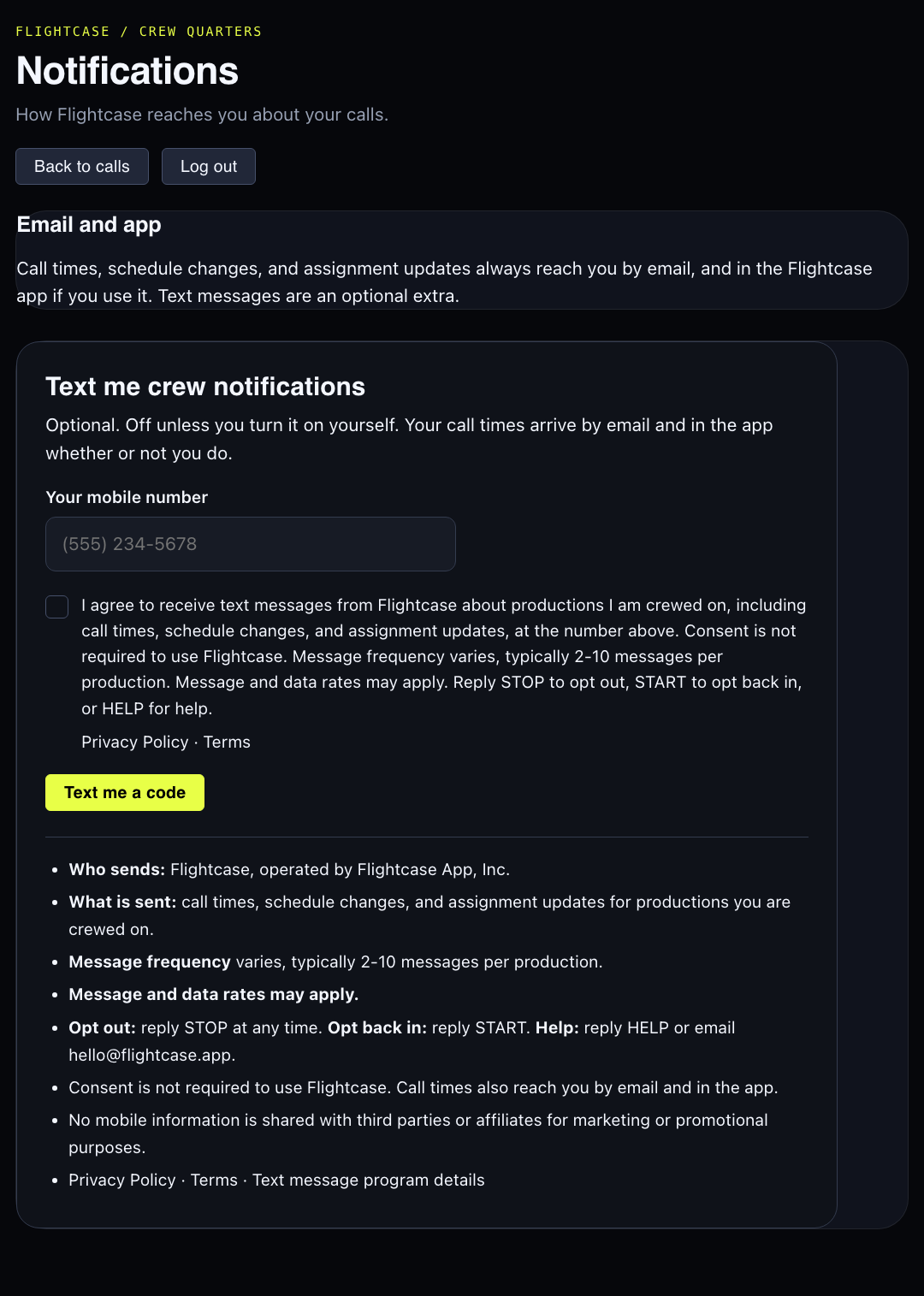
The same control, rendered live from the application:
Text me crew notifications
This is the control as a crew member sees it under Preferences › Notifications. It is shown here for reference and cannot be submitted.
Optional. Off unless you turn it on yourself. Your call times arrive by email and in the app whether or not you do.
- Who sends: Flightcase, operated by Flightcase App, Inc.
- What is sent: call times, schedule changes, and assignment updates for productions you are crewed on.
- Message frequency varies, typically 2-10 messages per production.
- Message and data rates may apply.
- Opt out: reply STOP at any time. Opt back in: reply START. Help: reply HELP or email hello@flightcase.app.
- Consent is not required to use Flightcase. Call times also reach you by email and in the app.
- No mobile information is shared with third parties or affiliates for marketing or promotional purposes.
- Privacy Policy · Terms · Text message program details
Consent wording
Shown verbatim beside the checkbox (wording version crew-sms-2026-10):
I agree to receive text messages from Flightcase about productions I am crewed on, including call times, schedule changes, and assignment updates, at the number above. Consent is not required to use Flightcase. Message frequency varies, typically 2-10 messages per production. Message and data rates may apply. Reply STOP to opt out, START to opt back in, or HELP for help.
The Privacy Policy and Terms are linked beside it. Wording is versioned: a change creates a new version, so every consent already collected still resolves to the exact sentence that person saw.
Sample messages
- Crew callFlightcase: Your call for Hamilton load-in is Tue Oct 14, 7:00 AM. Details: https://flightcase.app/t/k3x9a2m7qd Reply STOP to opt out.
- Call time changeFlightcase: Your call time for Hamilton load-in changed - now Tue Oct 14, 8:30 AM. Details: https://flightcase.app/t/k3x9a2m7qd Reply STOP to opt out.
- Added to crewFlightcase: You have been added to the crew for Hamilton load-out, Fri Oct 17, 11:00 PM. Details: https://flightcase.app/t/k3x9a2m7qd Reply STOP to opt out.
- Verification codeFlightcase: Your verification code is 482913. It expires in 10 minutes. Reply STOP to opt out.